Laser Marking Machine Buying Guide: How to Choose the Right One
You need to carefully think about your industry's needs, the types of materials you work with, and your production goals in order to choose the right laser marking machine. Understanding the basics of laser technology, like fiber, CO2, and UV systems, can help you match the right powers to your task, whether you're marking metals for car traceability or personalizing jewelry. When you look at things like writing speed, accuracy, power output, and software integration, you can be sure that your investment will last and meet the changing needs of industry in today's market.
Understanding Laser Marking Machines – Core Concepts and Working Principles
Laser marking has changed the way that companies make lasting, high-quality labels for their goods. A laser marking machine works by focusing a beam of light onto the surface of a material. This changes the surface in a controlled way, leaving lines that can be seen without touching it. This process doesn't require any touch between the tools or products like inks or solvents, so it is both cost-effective and good for the environment.
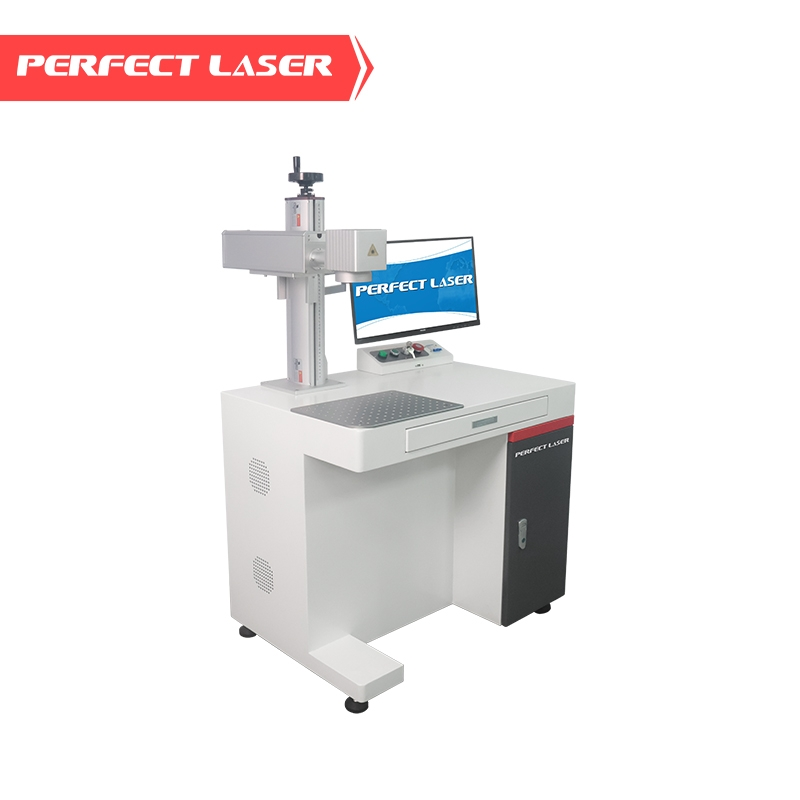
How Laser Marking Technology Works
An strong laser beam is precisely controlled by galvanometer mirrors to start the operation. Rapidly moving mirrors guide the beam to the workpiece to trace drawings, text, barcodes, or photographs. Type of laser and material properties determine these effects of laser energy. Heat affects certain materials' surface color without removing anything in annealing. Others are carved or etched (the laser roughens the surface). Fiber lasers are ideal for metals and engineered polymers due to their 1064 nm frequency. Their solid-state construction optimizes beam quality and electricity use, converting energy into laser power with low waste. Organic materials like leather, wood, paper, and certain plastics operate well with 10,600 nm CO2 lasers. UV laser "cold marking" protects heat-sensitive objects including glass, silicon chips, and fragile polymers using 355 nm ultraviolet radiation.
Key Laser Types and Their Applications
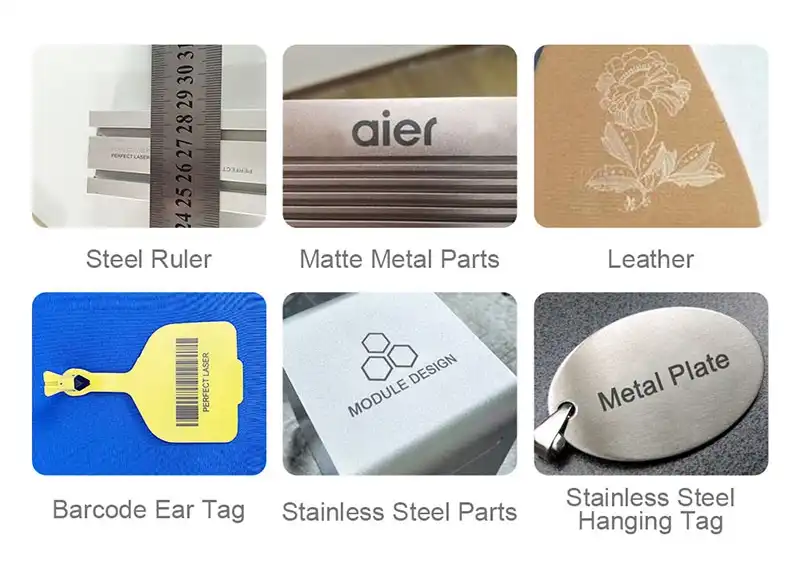
Know which laser is suitable for your production requirements before purchasing. In industries that mark metal often, fiber laser marking equipment are used. They can engrave stainless steel, aluminum, titanium, and other metals at 7000 mm/s because to their high output power. This makes them vital for identifying vehicle parts, tracking aircraft parts, and marking equipment. Non-metallic industries utilize CO2 devices. Packaging companies use them to print batch numbers and expiry dates on flexible films and cardboard. Signs and sculptures are made using CO2 lasers at woodworking businesses. How this process marks glass and ceramics depends on how they are handled and coated. UV laser engravers are utilized for precise detail and low heat. Manufacturers utilize UV systems to identify PCBs, ICs, and smartphone parts without heating them, which may harm sensitive hardware. UV lasers can generate tiny spots for micron-level precision in board-level coding and micro-QR codes.
Comparing Laser Marking with Alternative Methods
While dot peen, inkjet printing, and mechanical engraving are still used, laser technology offers advantages. Dot peen devices employ a carbide or diamond-tipped stylus to regulate surface contact to draw lines. These markings endure a long time but are less clear and rapid than laser systems and mechanically stress things. Code-fast inkjet printing requires constant ink purchases and fades, smudges, and wears out under harsh situations. Mechanical engraving uses spinning cutting instruments to remove material. This technology works in certain instances, but it wears out tools rapidly, requires frequent replacement, and can't achieve as fine a detail as lasers. Laser marking eliminates these issues and creates durable, high-contrast lines that can withstand chemicals, heat, and abrasion. Laser material compatibility varies greatly. Fiber systems operate well on polished aluminum, bare metals, and certain polymers with laser-sensitive constituents. CO2 lasers cut treated metals, wood, plastic, rubber, leather, and leather. UV lasers can cut glass, sapphire, ceramics, and medical polymers. Understanding these links helps procurement personnel locate technologies that meet product needs and manufacturing methods.
Criteria for Choosing the Right Laser Marking Machine
Choosing equipment that meets your working needs requires looking at a number of factors that are all linked. Your choice should take into account both the current production needs and the expected growth paths.
Defining Your Procurement Scenario
Different employees create objectives when a firm buys equipment. OEMs use marking systems in automated production lines that can simply link to software, utilize industrial standards like Ethernet/IP, and have tiny footprints that don't disrupt line layout. Distributors that serve several customers benefit being able to move between tasks rapidly. Engineers monitor pulse frequency, beam quality, and positioning precision to provide consistent markings and fast work. Purchasing managers compare performance to total cost of ownership, which includes energy usage, service delays, and vendor support. Define your role and objectives to speed up review. Are you seeking for a standalone desktop machine for rare modifications or an all-in-one for rapid production marking? Will staff require extensive training, or do you need simple, quick-learning software? Answering these concerns beforehand may prevent expensive issues if equipment skills don't meet operational demands.
Critical Evaluation Metrics
Laser power affects marking speed and material compatibility. For shallow marking of metals and polymers, 20W to 30W systems work well. Mid-range (30W–50W) machines balance speed with engraving power. They manage moderate production rates across materials. In high-volume industrial environments, high-power systems with more over 50W can deeply etch hardened steels and process huge volumes fast, justifying their higher price. Marking speed affects cycle times and output. Fiber laser marking machine systems can read at 7000 mm/s, reducing part work time. The pattern's intricacy, fill density, and material reaction determine the outcome. How effectively a system marks your unique tasks is more significant than its speed. Resolution displays the tiniest detail. Writing, logos, and microcodes are easier to read with smaller spot sizes and fine beam control. A high-quality laser marking machine achieves this by balancing spot size and beam stability. Electronics businesses that label circuit boards precisely value accuracy above speed. Automotive manufacturers mark larger parts for depth and contrast rather than precision. How smoothly processes execute and integrate depends on software. Advanced applications input CAD files, automatically produce serial numbers, link to databases for changing data labeling, and interface with vision systems for component locating and quality control. Easy-to-use interfaces reduce instructional time and operational errors. Support for industry standards including GS1 DataMatrix codes and UDI compliance helps medical and aeronautical firms comply.
Maintenance, Reliability, and Long-Term Value
Different technologies need different upkeep. With occasional lens cleaning and air filter changes, fiber laser sources may last over 100,000 hours. Every 5,000 to 10,000 hours, CO2 devices must replace their laser tubes and verify their optical alignment. UV lasers provide reliable performance with less maintenance. Cooling systems impact installation and operation costs. Because they don't need water chillers, air-cooled devices are simpler to install and need less equipment. They perform well in stable temperatures. Plumbing and chiller maintenance are needed for water-cooled systems to manage more power and longer duty cycles. Workspace limits machine choice. Small desktop versions are ideal for work shops and small enterprises since they take up less floor space. Portable devices let you designate large or fixed sections. Lifting-type designs may accommodate different-height parts, while full-enclosed versions improve safety and dust control for sensitive locations. Budget worries go beyond purchase price. Energy, replacement parts, maintenance, and downtime comprise the total cost of ownership. Famous brands' systems are more dependable, have longer-lasting parts, and have timely technical support to keep production operating smoothly, justifying their higher pricing.
Comparison of Popular Laser Marking Machines and Market Options
There are many laser writing options on the global market, made by companies in Europe, Asia, and North America. Buyers can make their way through this complicated world by looking at things like a brand's image, how it sets prices, and its support networks.
Leading Manufacturers and Brand Considerations
Long-standing, stable manufacturers normally give complete assistance. CE, TUV, and SGS certifications demonstrate a company's safety and quality commitment. Patent filings and ongoing product innovation indicate that manufacturers with robust R&D programs build equipment using the latest technology. Industrial laser systems have been Perfect Laser's specialty since 1995. The firm serves electronics, aerospace, and other industries with over 300 equipment types in 20 lines. They provide tiny, portable, desktop, lifting, colored, standby, and full-enclosed fiber laser marking machines for a variety of job settings. Rotary tools can operate on cylinders, and 3D dynamic focus systems can work on complexly curved regions without moving the machine. Authorized dealer networks guarantee proper installation, training, and servicing. Buyers should ensure suppliers have adequate parts and engage plant-trained technicians. Service centers near one other speed up expert assistance response times.
Pricing Structures and Investment Strategies
Fiber laser marking equipment vary in price dependent on power, setup, and functionality, and the laser marking machine price similarly reflects these factors. Basic desktops with 20W sources are affordable for small organizations. Growing firms may create more with mid-range systems with 30W to 50W power and improved automation. Industrial-grade systems with 50W or more outputs, built-in safety enclosures, and complex software cost extra because of their high throughput and durability. CO2 laser systems are usually cheaper than fiber units, although they need more maintenance and tube changes. Complex and specialized parts and optical systems make UV laser systems the most costly initial investment. However, their particular skills sometimes justify the expenses. Finance options assist monitor significant expenditures. Leasing spreads costs and frees up operational cash. Some manufacturers provide flexible payment options, discounts for multiple units, or training, installation, and extended warranties. Comparing the entire cost of ownership over five years is simpler than the initial price. Warranty coverage varies widely across providers. Most parts have a one-year warranty, however laser sources might be covered longer. Premium fiber laser sources have two-year warranties. This demonstrates their confidence in the components and provides purchasers financial protection. The warranty should state what is covered, how long service calls are handled, and if repairs may be done on-site or transferred to the center.
Support Services and Post-Purchase Considerations
Setup and testing are done correctly with installation support. Professional installation services usually include uncrating, mechanical assembly, electrical links, setting up software, and making sure the system works. Comprehensive training helps workers get used to daily tasks, maintenance tasks, and basic fixing, which lowers the number of problems that arise at the start of an operation. Long-term happiness and equipment uptime are directly affected by the level of after-sales service. Technical help that is quick to respond—by phone, email, or remote connection—fixes problems quickly, so work doesn't have to stop. Machines keep running because they can get new parts quickly. Manufacturers offer regular repair plans that help keep things running at their best and find problems before they break.
Maintenance, Safety, and Long-Term Use Best Practices
Maintenance and safety rules that are followed correctly will protect your property, keep your employees safe, and keep the quality of your work uniform.
Essential Maintenance Routines
Daily cleaning includes checking protecting screens and focusing lenses for dust. Dust, smoking residue, and processing debris steadily degrade the beam and writing. Lens washing with the correct chemicals and lint-free materials restores optical performance. Checking airflow or coolant levels in air-cooled or water-cooled systems prevents laser sources from overheating and breaking. Checking motion system and beam path alignment drift and wear and looseness is a weekly task. Lubricating linear guides and bearings per manufacturer's recommendations ensures smooth movement and accurate setup. Electrical link tightness checks prevent occasional defects and safety issues. Monthly air filter service is also required. Changing or cleaning filters maintains airflow, preventing dust accumulation on equipment and humans. Test patterns calibrate marking accuracy to keep dimensions within limitations. If your computer fails, you may lose your settings and work data. Software safeguards these files.
Troubleshooting Common Issues
Visual pollution or attention shifts may degrade marking quality. Lens cleaning usually restores function. If problems persist, check the focus height and recalibrate. Uneven mark level over the work area may indicate a malfunctioning beam delivery system or worn-out motion system that requires expert servicing. The most typical reasons control computers and laser systems can't connect are cable, driver, or network setup issues. Planning to check physical connections, software settings, and communication mechanisms helps uncover the core reason. Follow the manufacturer's computer specifications to prevent compatibility issues. To fix unexpected error messages or issues with a cheap laser marking machine, consult the equipment's manual and contact the manufacturer's professional help. You might lose your warranty and risk your safety if you repair anything not covered by operator-level maintenance. Service professionals can swiftly diagnose problems by noting down error codes, working circumstances, and previous procedures.
Safety Protocols and Regulatory Compliance
Following laser safety standards is crucial since they are harmful. Factory marking lasers, Class 4, may damage your eyes and skin with their direct or reflected radiation. Fully sealed systems with integrated safety doors prevent injuries best. Open-frame systems need restricted, sign-marked areas with limited access. Working near beam paths requires laser safety glasses with band ratings. Proper airflow or fume extraction systems remove writing-related airborne pollutants, improving lung health. Regular safety training helps personnel recall procedures and recognize hazards. Regulatory compliance varies by location, although it usually involves pollutants, energy, and workplace safety. CE accreditation indicates a product satisfies European health, safety, and environmental requirements. OSHA sets occupational safety requirements in the US. Know the laws and make sure your laser marking equipment follows them to avoid legal issues and save workers.
Optimizing ROI Through Upgrades and Updates
Manufacturer changes for software often include bug fixes, new features, and better speed. Keeping software versions up to date makes it work better and may make it compatible with new file types or devices. Other updates make processing methods better, which cuts down on marking time without changing the hardware. Upgrading hardware makes tools last longer and do more. By replacing laser sources when they hit the end of their useful life, performance is returned to where it was before. Marking cylinder-shaped parts is possible by adding rotating devices. Adding vision systems simplifies the positioning and orientation of parts, which cuts down on setup time and raises output. Modular designs that allow for these kinds of upgrades protect original investments by letting capabilities grow in small steps.
Making the Final Decision – Tailored Recommendations for B2B Clients
Matching the specs of tools to the needs of the business guarantees the best performance and return on investment.
Industry-Specific Application Guidance
3C and Consumer Electronics Manufacturing requires very precise markings on small parts like the cases for smartphones, tablets, and wearable tech. High-speed integration with automatic assembly lines keeps production going while adding logos and traceability tags. These needs can be met by fiber laser devices with small spot sizes and fast scanning speeds. The ability to work with a variety of materials is useful for making gadgets that use metals, plastics, and alloys. Automotive and Aerospace Parts Suppliers need marks that are deep and last a long time. These marks must be able to stand up to hard service conditions like high and low temperatures, chemicals, and mechanical wear. Directly marking important parts makes them able to be tracked throughout their entire life, which helps with quality control and managing recalls. Hardened steels, titanium metals, and aluminum casts can all be permanently marked with high-power fiber lasers. It is necessary to follow industry norms, such as UID marking in aerospace and VIN marking in the car sectors.
Electronics and PCB Manufacturing have their own problems, like the need for very fine marking, parts that are sensitive to static electricity, and plans with a lot of components. UV laser systems work best here because they can be accurate down to the micron level without making too much heat that could damage nearby electronics. Traceability coding at the board level works perfectly with SMT production lines, marking finished parts with QR codes, serial numbers, and maker names. Industrial and Hardware Sectors including precision machinery, tools, and building materials benefit from high-contrast branding that remains legible despite rough handling and environmental exposure. Fiber lasers leave strong marks on parts made of tool steel, cast iron, and stainless steel. Customization options let you use a range of part shapes and markings, from simple part numbers to complicated logos and technical specs. Luxury and Personalization Markets encompassing jewelry, watches, and gift items prioritize aesthetic finishes that enhance rather than detract from product appearance. Precious metals and jewels are kept safe from damage by treating them carefully. Fiber and UV methods are both used in these markets, but the right one is picked based on the materials. Personalization features let you make engravings that are unique to each customer, which increases value and sets you apart in competitive markets.

Scalability and Integration Considerations
As the amount of goods made increases, a laser marking machine that can keep up with demand is needed. Modular systems that can add mechanical parts like conveyors, part feeders, and robotic filling can increase output without having to update the whole system. Software that works with networks lets you handle jobs from one place across multiple marking stations, which makes multi-machine facilities more efficient. It's easy to connect to current corporate resource planning and industrial execution tools, which makes operations run more smoothly. Industry-standard communication methods make it easier to share data, which lets you keep an eye on production in real time and record quality information. Vision system compatibility improves automation by letting parts that are marked in different places adapt to their new location.
Supplier Partnership and Long-Term Success
Your relationship with the company that sells you tools goes far beyond the initial buy. Technical help that responds quickly cuts down on downtime when problems happen. Having access to application experts can help you get the best marking settings for new goods or materials. As technology changes and new features become available, training programs make sure that workers stay up to date. If a supplier offers trial services, you can test how well the equipment works on real parts before you decide to buy it. By testing different laser types, power levels, and writing settings on your materials, you can be sure that the system you choose will work as expected. To build buyer trust, many companies, including Perfect Laser, offer proofing tests and sample marks.
Conclusion
To choose the best laser marking machine, you have to think about your long-term strategy goals, your budget, and your technical needs. Understanding the basic laser technologies—such as fiber, CO2, and UV systems—and how they work with different materials will help you find the right answers. To make sure operating fit, you should compare power levels, marking speed, resolution, and software skills to your output needs. Protecting your investment means thinking about things like safety features, upkeep needs, and the quality of provider support. Customized methods are needed for industry-specific uses like tracking cars and personalizing jewelry. Working with experienced providers who offer full testing, installation, training, and service after the sale turns buying equipment into a strategic relationship that helps the business succeed and gain a competitive edge.
FAQ
1. How do I select the appropriate laser marking machine based on material types?
The right laser technology depends on the makeup of the material. Fiber laser systems work great on metals like stainless steel, aluminum, titanium, brass, and copper. They also work great on specialized plastics that have been treated with laser-sensitive chemicals. Organic things like wood, leather, plastic, rubber, glass, and paper work best with CO2 lasers. Some polymers, glass, ceramics, and silicon chips are heat-sensitive surfaces that can be worked with by UV lasers. Before buying, testing samples on potential tools makes sure they are compatible and checks the quality of the marks.
2. What are the core differences between fiber and CO2 laser marking systems?
Fiber lasers work at shorter wavelengths that are better absorbed by metals. They also use electricity more efficiently and don't need much upkeep over their 100,000-hour lifetimes. CO2 lasers have longer ranges that work better with biological materials. They also need their tubes to be replaced more often and use more energy. Fiber systems tend to mark things more quickly and take up less space, while CO2 systems are cheaper to buy and are better for non-metal uses.
3. What financing or leasing options minimize initial investment barriers?
Many sellers offer leasing plans that spread costs over several years, which helps keep operating capital high. Financing equipment through specialty lenders sets up payments that are in line with how much money the production brings in. When you buy more than one machine, you can get a deal on the price of each one. Some makers offer flexible payment plans or packages that include installation and training. This lowers the initial cost and ensures proper implementation.
Partner with Perfect Laser for Precision Marking Solutions
Since 1995, Perfect Laser has been making industrial laser equipment that is trusted by companies around the world in the electronics, automobile, aircraft, and luxury goods industries. We have a wide range of fiber laser marking machines, including small, portable, desktop, lifting, colored, standby, and fully sealed models. We also have rotary accessories, UV purple light systems, and 3D dynamic focus platforms. With speeds of up to 7000 mm/s, two-year warranties on the laser sources, and certifications from CE, TUV, and SGS, our equipment meets the most stringent production needs while still being very accurate. Our experienced team offers help 24 hours a day, 7 days a week, free application testing, and unique solutions. Get in touch with us at [email protected] to talk about your needs with our laser marking machine maker pros and find out how our technology can help you make more things.
References
1. Dahotre, N.B. and Harimkar, S.P. (2008). Laser Fabrication and Machining of Materials. Springer Science and Business Media.
2. Ion, J.C. (2005). Laser Processing of Engineering Materials: Principles, Procedure and Industrial Application. Elsevier Butterworth-Heinemann.
3. Steen, W.M. and Mazumder, J. (2010). Laser Material Processing, 4th Edition. Springer-Verlag London Limited.
4. Migliore, L. (2008). Laser Materials Processing. CRC Press Taylor and Francis Group.
5. Ready, J.F. and Farson, D.F. (2001). LIA Handbook of Laser Materials Processing. Laser Institute of America, Magnolia Publishing.
6. Chryssolouris, G. (1991). Laser Machining: Theory and Practice. Springer-Verlag New York Inc.

share your inquiry, get the quotation accordingly.
第一张审核员说包含其他公司不能用_1755049724891.webp)
Perfect Laser – Global Manufacturer of Reliable Laser Solutions


